Programmatic Webflow Landing Pages: 7 Proven Secrets to Halving Your Google Ads CPC
Datronix · October 2026 · 11 min read
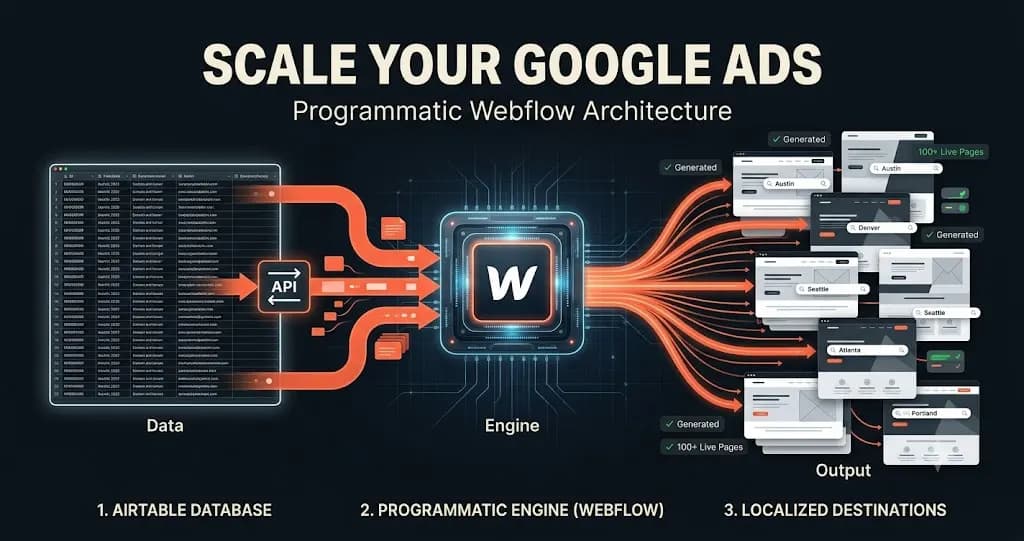
Programmatic Webflow landing pages are the ultimate competitive advantage for scaling B2B SaaS platforms and national service businesses in 2026.
Picture this: It is the start of Q3. Your Chief Marketing Officer (CMO) has just secured a massive $50,000/month budget to run highly targeted Google Ads. The strategy is brilliant on paper. If you are a B2B software company, you want to target 50 different “Alternative to [Competitor]” keywords. If you are a national commercial roofing company, you want to target 150 specific cities: “Commercial Roof Repair in Austin,” “Flat Roof Replacement in Denver,” and so on.
The performance marketing agency sets up the Google Ads campaigns flawlessly. There are 150 ad groups, each with hyper-specific ad copy perfectly matching the user’s search intent.
Then, the campaign launches, and the entire strategy collapses at the final hurdle.
Why? Because your marketing team does not have the bandwidth to manually design, build, and publish 150 unique, highly optimized landing pages. Instead, the agency takes all 150 of those hyper-specific ad clicks and dumps them onto one generic, heavily bloated corporate homepage, or at best, a handful of broad “Service” pages.
The result is catastrophic. The user searches for “Commercial Roof Repair in Austin,” clicks the ad, and lands on a page that says, “National Roofing Solutions for Enterprise Clients.” There is a massive psychological disconnect. The user feels they are in the wrong place and bounces within three seconds.
Your conversion rate plummets, your Cost Per Acquisition (CPA) skyrockets, and worst of all, Google’s algorithm financially penalizes you for providing a terrible user experience.
To survive in modern paid acquisition, you must merge paid media strategy with elite software engineering. You must stop building pages manually. Here is the definitive, CTO-level blueprint on how Datronix Tech engineers programmatic Webflow landing pages to automate design, achieve perfect message-match, double your Quality Score, and systematically cut your Cost Per Click (CPC) in half.
The Bleeding Neck: The Google Ads Quality Score Trap
Before we discuss the architectural cure, we must deeply analyze the financial disease. Why is sending 50 different search intents to a single page destroying your marketing budget?
Google Ads does not operate on a pure financial auction. You cannot simply outbid your competitors to win the top spot. Your actual Ad Rank and Cost Per Click (CPC) are determined by a strict formula: Max Bid × Quality Score.
Quality Score is a metric from 1 to 10 assigned to every keyword in your account. According to Google’s official documentation on Quality Score, this metric is calculated based on three primary pillars:
- Expected Click-Through Rate: How well your ad copy performs.
- Ad Relevance: How closely your ad text matches the user’s search query.
- Landing Page Experience: How relevant, fast, and transparent the destination page is to the user who clicked the ad.
When you send an “Austin Roofing” search to a generic national page, Google’s bots scan the page and instantly recognize the mismatch. You are assigned a Landing Page Experience score of “Below Average,” pulling your overall Quality Score down to a 3/10 or 4/10.
Because of this mathematical penalty, Google forces you to pay a massive premium often 200% to 300% more per click just to maintain your position on the page. Your competitors, who have built highly relevant pages, are paying a fraction of what you are paying for the exact same click.
(This is precisely why we previously documented the dangers of generic routing in our guide on why your website is bleeding money).
The Tourniquet: What Are Programmatic Webflow Landing Pages?
The solution to the Quality Score trap is a 1:1 attention ratio. If you have 150 ad groups, you need 150 landing pages. But you cannot build them manually.
Programmatic Webflow landing pages leverage the power of the Webflow Content Management System (CMS) acting as a dynamic database.
Instead of treating Webflow like a static canvas where designers drag and drop text boxes, we treat Webflow like a frontend software application. We build one single, highly optimized, conversion-focused “Template Page.” Then, we feed structured data into the CMS to dynamically generate 150 unique, pixel-perfect pages instantly.
This is not simple “Dynamic Text Replacement” (DTR) using JavaScript URL parameters. This is the generation of robust, indexable (or conditionally no-indexable), structurally unique pages that load natively on the server.
Here is the exact engineering blueprint our team at Datronix Tech utilizes to build this high-velocity marketing architecture.
The Engineering Blueprint: Architecting the System
Building a programmatic engine requires strict data architecture. If the database is messy, the generated pages will break.
Pillar 1: The Master CMS Collection Structure
We begin by creating a Master CMS Collection in Webflow (e.g., “City Landing Pages” or “Competitor Alternatives”). This collection acts as our central nervous system. We do not just add a “Name” and “Content” field. We engineer a highly granular database schema.
For a location-based programmatic build, the CMS schema would include:
- Hero H1 Headline: (e.g., “The #1 Commercial Roofers in [City Name]”)
- Dynamic Hero Subtitle: Contextualized to the region.
- Dynamic Hero Image: A specific, recognizable skyline or local team photo for that exact city, creating instant geographic trust.
- Local Phone Number: Tied to dynamic call-tracking software.
- Local Social Proof: Text fields for 3 specific reviews from clients in that exact city.
- Trust Badges: Conditional visibility switches for local state licensing logos.
By structuring the data this way, the resulting page isn’t just a generic template with a swapped-out city name; it feels like a bespoke, locally engineered website.
Pillar 2: Headless Data Management (The Airtable & API Bridge)
Managing 150 (or 1,000+) items inside the native Webflow CMS interface can become cumbersome for marketing teams. To build a true enterprise engine, we decouple the data management from the frontend presentation.
We utilize enterprise-grade databases like Airtable or Supabase. Your marketing team works inside a clean, spreadsheet-like Airtable interface. They can use AI (like OpenAI’s API) to mass-generate localized copy for 50 cities in minutes.
Once the data is approved in Airtable, we build a custom API middleware layer using Node.js or dedicated webhooks. This middleware securely pushes the data payload directly into the Webflow CMS API.
When your CMO hits “Sync,” 50 brand-new, hyper-targeted landing pages are generated, populated, and published to the live website in seconds. No designers required.
Pillar 3: Conditional Visibility and Component Architecture
A common failure point in programmatic builds is empty data. If a specific city does not have three local reviews yet, a poorly built template will display broken, empty text boxes.
Our programmatic Webflow landing pages rely heavily on advanced Conditional Visibility rules. We program the Webflow template to execute logic: If the “Local Review 3” field is empty, hide the entire review wrapper and collapse the grid.
This ensures that whether a CMS item has 100% of its data populated or only 70%, the page automatically restructures itself to maintain a flawless, high-end user interface.
Pillar 4: Technical SEO vs. Paid Isolation
When generating hundreds of pages, you must strictly manage search engine indexing. If you generate 500 landing pages that are too similar, Google will penalize your root domain for “Keyword Cannibalization” or “Duplicate Content.”
We implement strict SiteOps governance:
- Paid-Only Pages: If the programmatic pages are designed purely for Google Ads traffic and have low organic value, we programmatically inject
<meta name="robots" content="noindex">into theheadtag of the CMS template. The pages exist for ad clicks, but Google’s organic crawlers ignore them, protecting your main site’s SEO. - Organic SEO Pages: If the strategy is to capture long-tail organic search traffic (e.g., franchise SEO architecture), we engineer highly robust, differentiated content for each page, deploy perfect Canonical tags, and inject dynamic Schema.org JSON-LD structured data to win rich snippets in the SERPs.
The Financial ROI: Why the CapEx is Justified
Building a custom API integration and engineering a flawless programmatic CMS architecture requires a higher initial capital expenditure (CapEx) than simply duplicating a page manually three times. However, for a company spending over $10,000 a month on Google Ads, the operational and financial ROI is staggering.
1. Halving Your Cost Per Click (CPC)
When your landing page’s H1 headline, hero image, and metadata perfectly match the exact search query of the user, Google rewards you. Your Landing Page Experience score shoots up to “Above Average.” Your Quality Score climbs to a 9/10 or 10/10.
Because of the auction mathematics, Google now allows you to win the top ad placement for significantly less money. We routinely see brands cut their CPC by 40% to 50% simply by implementing programmatic Webflow landing pages with perfect message matching.
2. Doubling Conversion Rates (The Psychology of Relevance)
When a user clicks an ad for “Enterprise CRM for Healthcare” and lands on a page showing doctors using the software, displaying healthcare compliance badges (HIPAA), and featuring testimonials from hospital administrators, the friction to convert drops to zero.
By eliminating the cognitive load of forcing the user to “find” the relevant information on a generic homepage, conversion rates reliably double. You acquire twice as many customers for the exact same ad spend.
3. Infinite Scalability Without Payroll Bloat
If your company expands to 20 new markets next month, how long does it take your current team to launch 20 new landing pages? If the answer is “three weeks and a lot of overtime,” your growth is bottlenecked by manual labor.
With a programmatic architecture, launching 20 new markets takes an intern 15 minutes in Airtable. You have effectively decoupled your marketing scalability from your human resource payroll.
Why Not Just Use Third-Party Landing Page Builders?
A common objection is: “Why build this in Webflow when I can just use Unbounce or Instapage?”
Third-party landing page builders were revolutionary five years ago, but in 2026, they present massive technical debt.
- Brand Fragmentation: Pages built on third-party tools rarely match the pixel-perfect design system of your core website. They look like cheap bolt-ons.
- Domain Friction: They often require messy subdomains (e.g.,
try.yoursite.com), which dilutes your brand equity and complicates tracking. - Performance Penalties: Third-party builders are notoriously bloated with heavy JavaScript, failing Google’s Core Web Vitals and triggering load-speed penalties.
Webflow allows us to generate these pages natively on your root domain, utilizing your exact CSS classes, and loading with sub-second speeds. (To understand the impact of speed on conversions, read our teardown on why your website’s speed matters).
Advanced SiteOps: Closing the Loop with Server-Side Tracking
A high-velocity frontend is useless if the data tracking is broken. When deploying hundreds of programmatic pages, we must ensure every conversion is accurately attributed back to the specific Google Ad click.
Because modern browsers block third-party cookies, we pair our programmatic Webflow landing pages with robust server-side tagging. When a user submits a form on one of the 150 dynamically generated pages, the payload is sent securely to a Google Cloud server, matched with the specific GCLID (Google Click ID), and fired directly to the Google Ads API.
This ensures your Google Ads machine-learning algorithms receive 100% accurate data on which specific programmatic page is generating the highest value pipeline, creating an unstoppable feedback loop of optimization.
Conclusion: Stop Bringing a Knife to a Gunfight
In the highly saturated, hyper-competitive Google Ads auctions of 2026, you cannot win by sending expensive, intent-driven traffic to generic web pages. You are competing against elite data-driven organizations that are leveraging automation to provide perfectly relevant user experiences.
To lower your CPA and scale your customer acquisition, you must merge your performance marketing strategy with programmatic software engineering.
By leveraging the Webflow CMS, custom API middleware, and strict data architecture, you transform your website from a static brochure into an aggressive, dynamic lead-generation machine.
(Note: When scoping custom CMS architectures, API integrations, and programmatic deployments, all Datronix Tech B2B service proposals natively include the requisite 18% GST charge, ensuring complete financial transparency from the initial audit to final deployment).
Are you bleeding ad spend on generic, low-converting landing pages?

👉 Book a Programmatic Landing Page Strategy Call. Stop wasting money on bad Quality Scores. Let our senior engineers audit your current Google Ads setup, map your CMS database schema, and calculate exactly how much a programmatic Webflow architecture will lower your Cost Per Acquisition.

Schedule your strategic technical review today and start converting clicks with perfect message-match.
Related Posts
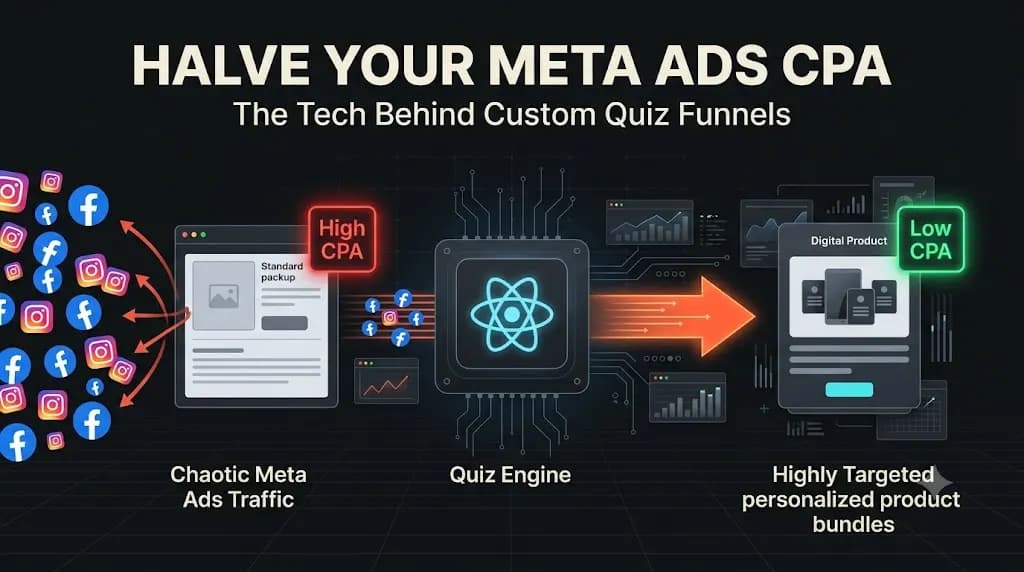
Custom Quiz Funnel: The Engineering Secret to Halving Your Meta Ads CPA
When you send distracted, scrolling social media traffic directly to a standard, static Shopify Product Detail Page (PDP), you introduce immediate friction, confusion, and the “Paradox of Choice.” To survive and scale profitably in 2026, elite direct-to-consumer (DTC) and wellness brands are abandoning the standard PDP route. Instead, they are implementing a custom quiz funnel. […]
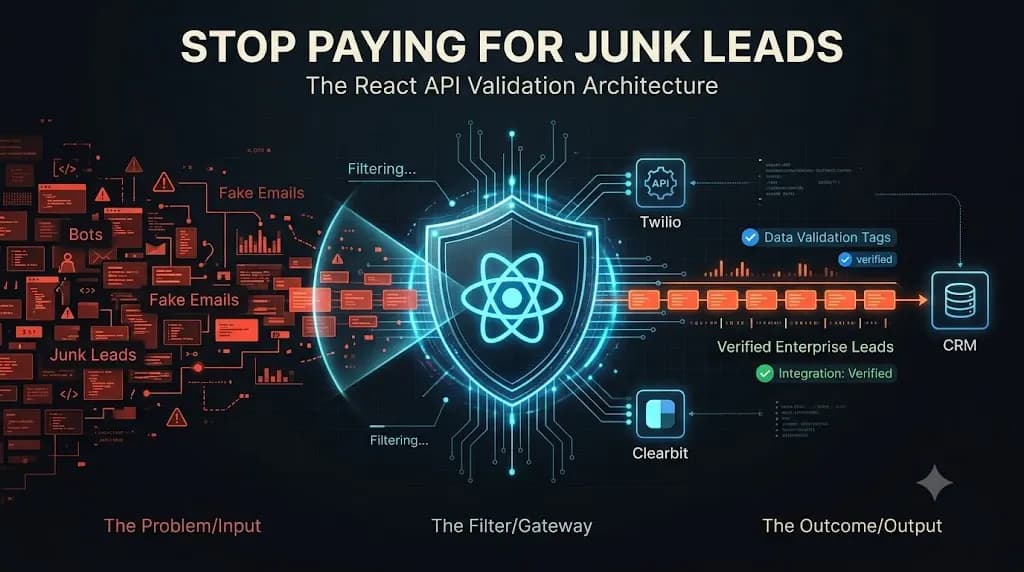
Stop Paying for Junk Leads: The Engineering Behind Custom React Forms API Validation
When you rely on basic, off-the-shelf WordPress forms or standard HTML inputs, you are rolling out the red carpet for bots, unmotivated browsers, and unqualified traffic. To protect your pipeline and scale your revenue, you must implement custom React forms API validation. It is a Tuesday morning, and the tension in your weekly revenue meeting […]