Here is the definitive, CTO-level engineering teardown of why Apple ruthlessly hunts down web wrappers, the false economy of cheap app development, and the exact architectural blueprint Datronix Tech uses to build blazing-fast, truly native Flutter e-commerce apps that sail through Apple’s strict compliance reviews.
It is one of the most painful rites of passage for a scaling e-commerce brand.
Your Shopify store is generating millions in revenue, and your mobile traffic is hovering around 75%. You realize that to maximize Customer Lifetime Value (LTV) and bypass the rising costs of Meta and Google Ads, you need a dedicated mobile app. You want a piece of real estate directly on your customer’s home screen.
You hire a “budget-friendly” freelancer or purchase a cheap $99 plugin that promises to “Turn your Shopify store into an iOS and Android app in 24 hours!” You pay the fee, wait a few days, and receive the application files. You excitedly submit your new app to the Apple App Store.
Three days later, you receive the dreaded email from the Apple App Review team:
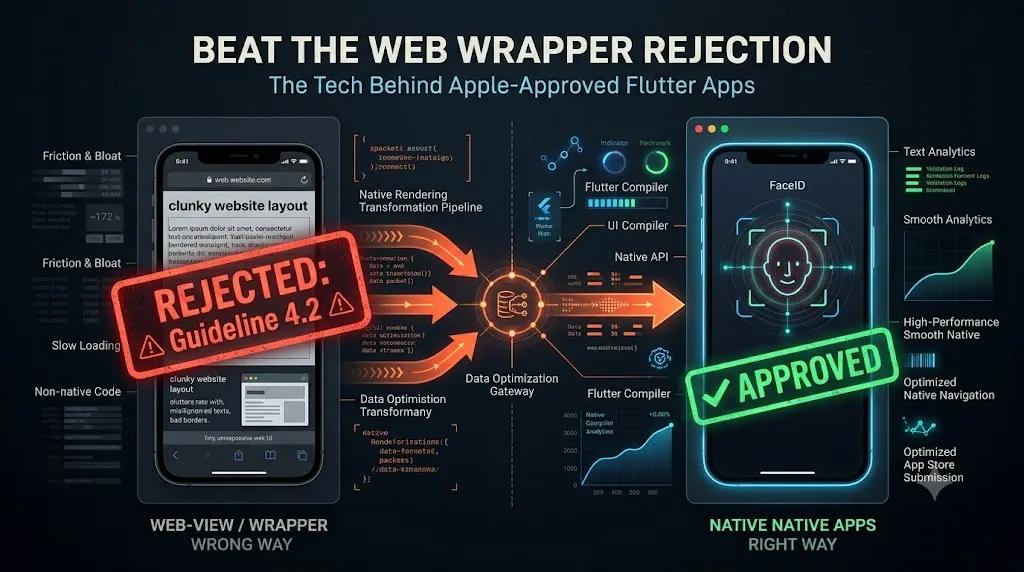
“Guideline 4.2 – Design – Minimum Functionality. Your app provides a limited user experience as it is not sufficiently different from a mobile browsing experience. As such, the experience it provides is similar to the general experience of using Safari.”
Your app was rejected. The money you spent is completely gone. You cannot appeal it because Apple is absolutely right: you didn’t build a mobile app. You built a “Web Wrapper.”
If you are currently staring at an App Store rejection notice, or if you are evaluating how to build a mobile presence without repeating this catastrophic mistake, you are in the right place.
01The Bleeding Neck: The Anatomy of a Webview Rejection
To understand the cure, we must deeply analyze the disease. Why does Apple hate web wrappers so much?
A “Web Wrapper” (or Webview app) is essentially a hollow shell. The freelancer creates a blank iOS application and inserts a single component: a WKWebView (Apple’s native web browser rendering engine). They program this hidden browser to load your Shopify website’s URL and hide the URL bar.
To the untrained eye, it looks like an app. To Apple’s elite review engineers, it is an insult to their ecosystem.
According to the official Apple App Store Review Guidelines, specifically Section 4.2, an app must provide lasting entertainment value, robust utility, and native functionality.
Here is why web wrappers trigger instant rejections:
1. The UX/UI Friction
Websites are designed to be navigated with a mouse and scrolled with a trackpad. Native apps are designed for thumbs, gestures, and haptic feedback. A web wrapper inherits all the clunky dropdown menus, tiny tap targets, and slow loading times of your responsive website. If a user swipes back, the web wrapper often glitches or reloads the entire page, completely breaking the immersion.
2. Zero Offline Capabilities
If a user is on a subway and their 5G connection drops, a native app gracefully caches data, showing their cart or saved items. A web wrapper instantly throws a massive, ugly browser error: “Safari cannot open the page because your iPhone is not connected to the internet.” Apple refuses to host apps that break without Wi-Fi.
3. The Lack of Hardware Integration
Native apps leverage the hardware of the iPhone: the secure enclave for FaceID, the native Apple Pay API, the accelerometer, and the push notification service (APNs). Web wrappers cannot easily access these core hardware features. They offer nothing that Safari couldn’t do natively.
By paying for a web wrapper, you paid someone to put a picture of a house inside a frame, while expecting Apple to treat it like real estate.
02The False Economy of Cheap App Development
Founders often fall into the web wrapper trap because of budget constraints. When a traditional agency quotes $80,000 to build an app in Swift (for iOS) and Kotlin (for Android), the $5,000 web wrapper plugin looks like a miracle.
But this is a false economy.
Not only does the app get rejected, but even if you somehow slipped it past the reviewers by hiding its true nature, the user experience would actively damage your brand equity.
When your premium customers download your app expecting a VIP, high-speed shopping experience, and instead get a slow, glitchy web browser that forces them to type in their credit card manually, they will delete the app and leave a 1-star review.
You must bridge the gap between the $80,000 dual-native nightmare and the $5,000 webview scam.
The solution is a headless architecture powered by a Flutter e-commerce app.
03The Tourniquet: Architecting a True Native Experience
To secure App Store approval and deliver a world-class shopping experience, you must completely decouple your Shopify backend from the mobile user interface.
At Datronix Tech, we treat your mobile app as a standalone software engineering project. We utilize Google’s UI toolkit, Flutter, combined with the Shopify Storefront API.
Because Flutter compiles directly to native ARM machine code, it bypasses the slow JavaScript bridges used by older hybrid frameworks. It delivers buttery-smooth 120-frames-per-second (fps) animations, identical to apps coded directly in Swift.
Here is the four-pillar engineering blueprint we use to architect an app that Apple loves and customers obsess over.
Pillar 1: Headless Data via the Shopify Storefront API
In a native Flutter e-commerce app, the app does not load any Liquid template files. It does not load your website’s CSS.
Instead, the app makes secure, lightning-fast GraphQL requests directly to the Shopify Storefront API.
When the user opens the app, the Flutter UI asks Shopify: “Send me the JSON data for the top 10 best-selling products.” Shopify replies in milliseconds with pure, raw data (titles, prices, image URLs). Flutter takes that raw data and paints the screen natively using the phone’s Graphics Processing Unit (GPU).
Because we are only transferring raw JSON data instead of heavy HTML/CSS files, the app loads almost instantly, regardless of the user’s connection speed. This headless architecture is the ultimate foundation for high-scale retail operations.
Pillar 2: Native Device Integrations (The Approval Checklist)
To ensure Apple grants approval, we must prove the app utilizes native iOS/Android hardware features that a web browser cannot access securely.
- Biometric Authentication (FaceID / TouchID): We integrate Flutter’s local authentication packages with Shopify’s Customer API. When a user logs in for the first time, we securely store their authentication token inside the iOS Secure Enclave or Android Keystore. The next time they open the app, they simply look at their phone. FaceID scans them, retrieves the secure token, and logs them into their Shopify account instantly. No passwords required.
- Native Apple Pay & Google Pay: We do not force users into a clunky web checkout. We integrate native Apple Pay directly into the Flutter cart view. When the user taps “Buy,” the native iOS payment sheet slides up. The transaction happens securely at the OS level, drastically reducing cart abandonment and passing Apple’s strict e-commerce guidelines.
Pillar 3: Advanced State Management & Offline Caching
Apple demands that an app functions gracefully under poor network conditions. A web wrapper fails this test instantly.
In our Flutter e-commerce app architecture, we employ advanced State Management solutions (such as BLoC or Riverpod).
If a user adds three items to their cart while walking to the subway, our Flutter app saves that cart state locally on the device’s internal SQLite database. When the train goes underground and they lose 5G, the app does not crash. They can continue to browse previously loaded categories. The moment the train emerges and 5G is restored, the Flutter app silently syncs the local cart state with the Shopify Storefront API in the background.
This level of robust data handling is the hallmark of elite software engineering, completely separating your brand from amateur dropshippers.
Pillar 4: Real Push Notifications & Deep Linking
One of the primary ROI drivers for a mobile app is free retargeting via Push Notifications.
Web wrappers attempt to use “web push,” which is highly unreliable, frequently blocked by iOS, and completely unbranded.
We integrate Firebase Cloud Messaging (FCM) and the Apple Push Notification service (APNs) directly into the native Flutter code.
But we don’t just send generic alerts. We engineer Deep Linking. If you send a push notification that says “You left your favorite sneakers in the cart!”, tapping that notification does not just open the app’s homepage. The OS intercepts the deep link and instantly routes the user directly to the native Cart Screen with the sneakers already loaded, ready for a 1-tap Apple Pay checkout.
This seamless, frictionless user journey is exactly what Apple’s Guideline 4.2 demands, and it is exactly what converts casual browsers into lifelong, high-LTV customers.
04The Financial ROI of a True Native App
Transitioning from the idea of a cheap web wrapper to a bespoke Flutter e-commerce app requires a shift in financial perspective. You are not buying a plugin; you are investing in a proprietary digital asset.
However, for a Shopify store generating over $2M+ in annual revenue, the ROI is compounding and undeniable.
1. Eliminating the Meta Ads Dependency
Customer Acquisition Costs (CAC) on Meta and Google are rising every year. If you rely entirely on ads to drive repeat purchases, your margins will eventually collapse. A native app gives you owned real estate on your customer’s most personal device. With segmented, deep-linked push notifications, you can drive high-converting traffic to flash sales for zero ad spend, drastically increasing your blended ROAS.
2. Doubling the Conversion Rate
According to data compiled by retail analysts, native mobile apps convert at a rate 157% higher than mobile websites. Why? Because the friction is gone. There are no URLs to type, no passwords to remember (thanks to FaceID), and shipping details are pre-loaded via Apple Pay. You remove every psychological barrier to purchase.
3. Elevating Brand Equity
In 2026, consumers judge the quality of a brand by its digital experience. If your app feels like a cheap web browser, they assume your products are cheap. If your app feels like Nike, Lululemon, or Gymshark—lightning-fast, smooth, and hyper-responsive—they mentally categorize you as a premium, elite brand. They are willing to pay a premium for your products because the experience justifies the cost.
05Conclusion: Stop Taking Shortcuts
The Apple App Store is a gated community, and the guards are highly trained software engineers. You cannot trick them with a web wrapper, and attempting to do so only burns your capital and frustrates your leadership team.
To launch a mobile app that actually drives revenue, you must embrace the technical realities of native development.
By leveraging the headless power of the Shopify Storefront API and the cross-platform efficiency of a Flutter e-commerce app, you can achieve world-class, dual-platform (iOS and Android) performance without paying the bloated $80,000 “Native App Tax” of traditional agencies.
It is time to stop looking for software hacks and start building enterprise architecture.
(Note: When scoping custom Flutter applications, Shopify API middleware, and Apple/Google compliance deployments, all Datronix Tech B2B service proposals natively include the requisite 18% GST charge, ensuring complete financial transparency from the initial architecture audit to final App Store launch).
Schedule your strategic technical review today and let’s get you into the App Store.