Turning Your WordPress Site into a Native Mobile App: The Headless API Architecture
Datronix · October 2026 · 10 min read
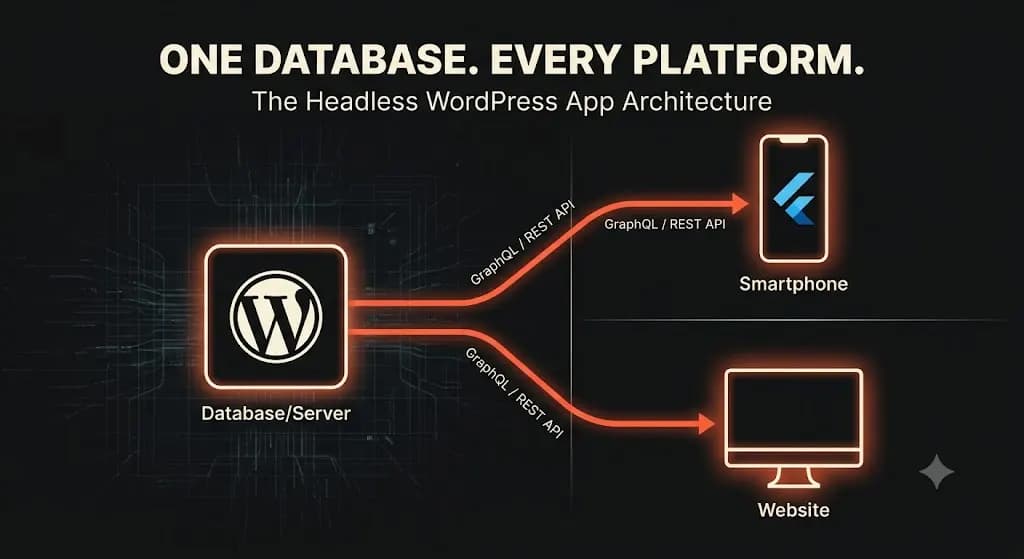
Here is the definitive, elite engineering playbook on how we build a Headless WordPress mobile app that allows your team to publish once, and instantly update everywhere.
It is a conversation that happens in boardrooms of scaling media companies, massive e-commerce retailers, and high-traffic directory sites every day.
The CEO says, “Our mobile traffic is at 70%. We need a dedicated iOS and Android app to increase retention and leverage push notifications.”
The Chief Marketing Officer agrees. But the Chief Technology Officer (CTO) immediately sees the nightmare unfolding.
Their entire business runs on a massive, complex WordPress (or WooCommerce) infrastructure. They have a team of 15 writers publishing 30 articles a day, or a warehouse managing 5,000 SKUs. If they build a standalone mobile app, how do they get the content into the app?
Do they have to hire an entire data entry team to copy and paste articles from WordPress into a separate mobile app database? Do they have to manage two different inventory systems? If a price changes on the website, how does the app know?
The answer to this operational nightmare is Headless Architecture.
You do not need to abandon your existing CMS, and you certainly do not need to manage two databases. By utilizing the WordPress REST API or GraphQL, you can transform your existing site into a “Headless Backend,” feeding content flawlessly into a custom, high-performance Flutter mobile application.
The Bleeding Neck: The “Two Database” Disaster
To understand why Headless is the ultimate cure, we must first look at how companies historically failed when trying to build mobile apps alongside legacy websites.
1. The WebView Hack (The Cheap Route)
The cheapest way to get a WordPress site into the App Store is to build a “WebView” app. This is essentially a fake app—it just loads a mobile browser window inside an app shell and displays your website.
Apple routinely rejects WebView apps because they offer a terrible user experience. They don’t support native gestures, offline caching is virtually nonexistent, and the navigation feels clunky. It is a desktop experience crammed into a phone. If you are a serious brand, a WebView app destroys your credibility.
2. The Siloed Database (The Expensive Route)
The other extreme is building a completely separate backend for the mobile app using Firebase or AWS Amplify.
While the app will perform beautifully, your operations team is now trapped in a data silo. When your marketing team publishes a new blog post on WordPress, it doesn’t appear on the app. When a customer registers on the app, their account doesn’t exist on your WooCommerce store. You end up spending thousands of dollars a month building fragile Zapier workflows just to keep the two databases loosely synced.
(We recently published an entire engineering teardown on why relying on Zapier and software glue destroys enterprise margins).
The Tourniquet: The Headless WordPress Mobile App Architecture
The solution is to separate the “Head” (the visual front-end that the user sees) from the “Body” (the database and content management system).
In a Headless WordPress mobile app architecture, WordPress stops being a website builder. It becomes a pure, centralized data engine. Your editorial and e-commerce teams continue to log into the familiar wp-admin dashboard. They publish posts, update products, and manage users exactly as they always have.
But instead of WordPress rendering HTML files, it exposes that raw data via an API (Application Programming Interface). Our custom mobile app (built in Flutter) simply “listens” to that API.
Here is the exact technical blueprint of how this architecture is engineered.
Pillar 1: The API Layer (REST vs. WPGraphQL)
To get data out of WordPress and into a mobile app, we need a communication protocol. We utilize two primary methods, depending on the complexity of your data.
The WordPress REST API: Since version 4.7, WordPress natively includes a REST API. If you append /wp-json/wp/v2/posts to your WordPress URL, you will see a raw JSON feed of your articles. This is fantastic for simple media sites. The mobile app makes an HTTP GET request to this endpoint, downloads the JSON payload, and renders the articles natively on the phone.
WPGraphQL (The Enterprise Standard): If you are running a complex WooCommerce store or a directory with heavy Custom Post Types (CPTs) and Advanced Custom Fields (ACF), the REST API can become inefficient. It often suffers from “Over-fetching” (downloading too much useless data) or “Under-fetching” (requiring five different API calls just to load one product page).
For enterprise builds, we install the WPGraphQL plugin. GraphQL allows our Flutter mobile app to ask for exactly what it needs, and nothing more.
# Example GraphQL Query from the Mobile App
query GetLatestProducts {
  products(first: 10) {
    nodes {
      databaseId
      name
      price
      image {
        sourceUrl
      }
    }
  }
}
This single query fetches the exact ID, name, price, and image URL of 10 products in milliseconds. This is the cornerstone of a high-speed Headless WordPress mobile app.
Pillar 2: Secure Authentication (JWT & OAuth)
Reading public blog posts is easy. But what if a user wants to log into their account on the mobile app, view their past WooCommerce orders, or leave a comment?
We must establish a secure authentication bridge between the mobile device and the WordPress database. We do not use standard WordPress cookies, as they do not work cleanly in native mobile environments.
Instead, we engineer JSON Web Token (JWT) Authentication.
- The user types their email and password into the native Flutter app.
- The app sends a secure POST request to the WordPress API.
- WordPress verifies the credentials and returns a cryptographic JWT.
- The Flutter app stores this token securely on the device (using Keychain on iOS or Keystore on Android).
- For every subsequent request (like “Add to Cart” or “Update Profile”), the app attaches the JWT to the API header, proving the user’s identity securely without requiring them to log in again.
(This is the same secure authentication handshake we utilize when building custom API middleware for legacy ERP systems).
Pillar 3: The Front-End (Why We Build in Flutter)
Once the data is flowing securely out of WordPress, we need a premium engine to render it on the user’s phone.
As we detailed in our analysis of Flutter vs. React Native, we champion Flutter for headless integrations.
Flutter allows us to write one single, highly performant codebase (in Dart) that compiles down to native ARM code for both iOS and Android.
- Native Performance: Because Flutter doesn’t use a slow JavaScript bridge, it can parse massive JSON payloads from your WordPress API and render them in complex, fluid lists at 120 frames per second.
- Custom State Management: We use modern state management libraries (like BLoC or Riverpod) in Flutter to manage the data. If a user adds an item to their cart while offline, the app holds that state and automatically syncs it back to the WooCommerce API the moment they regain a 5G connection.
The Business ROI of a Headless Architecture
Transitioning to a Headless WordPress mobile app requires a significant initial capital expenditure (CapEx). You are building custom software, not buying a cheap plugin. However, for a business doing over $2M in revenue, the operational ROI compounds rapidly.
1. The “Publish Once, Update Everywhere” Velocity
This is the biggest operational win. Your editorial or merchandising team does not need to learn a new system. They do not need to duplicate their work.
When your editor clicks “Publish” on a breaking news story in WordPress, two things happen instantly:
- The article goes live on your website.
- The WordPress API updates, the mobile app detects the change, and the article appears natively on users’ phones.
We can even engineer Webhooks so that the moment a post is published, WordPress triggers Firebase Cloud Messaging (FCM) to automatically send a Push Notification to all app users. Complete operational synergy.
2. Radical Speed and Core Web Vitals
A hidden benefit of Headless Architecture is what it allows you to do with your website.
If WordPress is only acting as a backend API, it no longer needs to run heavy page builders (like Elementor) or complex theme files to render the front end. You can transition your actual website to a blazing-fast static site generator (like Next.js or Astro) that simply reads the same API as your mobile app.
This eradicates the dreaded “Plugin Hell,” dropping your website load times to under 1 second and drastically improving your SEO traffic via perfect Core Web Vitals.
3. Ultimate Security
In a standard WordPress setup, your database and your public-facing website exist on the same server. If a hacker exploits a vulnerability in a theme file, they gain access to the database.
In a strict headless environment, the WordPress backend can be completely hidden behind a firewall, hosted on a separate, unlisted subdomain (e.g., api.yourbrand.com). The public only interacts with the Flutter app or the static front end. The attack surface of your core database is drastically reduced.
Strategic Rollout: How We Execute the Migration
The biggest mistake agencies make when building a Headless WordPress mobile app is trying to build the app before auditing the database. This leads to massive API bottlenecks.
At Datronix Tech, we employ a strict, data-first engineering process:
- Phase 1: The Database & API Audit. We do not start with UI design. Our senior engineers audit your WordPress instance. We map every Custom Post Type, ACF field, and WooCommerce product variation. We design the GraphQL schema to ensure the data can be fetched quickly and efficiently.
- Phase 2: API Hardening. We install JWT authentication, clean up legacy plugin bloat that might slow down the REST API, and configure Redis caching at the server level so that your API can handle the load of 50,000 app users pulling data simultaneously.
- Phase 3: Flutter Prototyping. We build a wireframe version of the mobile app and connect it to your staging API. This allows your team to test the data flow and authentication handshake before we finalize the UI.
- Phase 4: Native UI Polish & Deployment. We finalize the Flutter development, ensuring pixel-perfect animations, and manage the rigorous deployment process to the Apple App Store and Google Play Store.
Conclusion: Stop Managing Two Databases
Your business data is your most valuable asset. If you fragment that data across multiple, disconnected platforms in a desperate attempt to launch a mobile app, you are destroying your operational efficiency.
By leveraging the native API capabilities of WordPress and the cross-platform power of Flutter, you can have the best of both worlds. You get the familiar, robust content management of WordPress, paired with the premium, high-speed user experience of a native mobile application.
It is time to stop copying and pasting data. It is time to build a unified architecture.
(Note: When scoping custom Headless architectures, API middleware, and mobile deployments, all Datronix Tech B2B service proposals natively include the requisite 18% GST charge, ensuring complete financial transparency from the initial audit to final deployment).
Are you terrified of managing a separate database for your mobile app?
👉 Get a WordPress-to-Mobile App Feasibility Audit. Do not write a single line of app code until you know your API is ready. Let our senior engineers audit your current WordPress database, map your Custom Post Types, and provide a clear, fixed-cost roadmap to turn your site into a headless data engine for a Flutter app. Schedule your strategic technical review today and let’s unify your tech stack.
Related Posts
Shopify Custom Bundle Apps: The Engineering Blueprint for Doubling Average Order Value
If you are trapped in this technical bottleneck, you are not alone. Off-the-shelf software is designed for generic use cases, not complex, branded merchandising. To scale beyond these limitations and unlock massive revenue growth, elite brands are investing in bespoke Shopify custom bundle apps. It is a scenario playing out at the highest levels of […]
Building Custom Web Apps: The Enterprise Cure for the “SaaS Frankenstein”
Building custom web apps is no longer a luxury reserved for Fortune 500 companies; it is an absolute survival requirement for mid-market businesses. It is Wednesday at 10:00 AM. Your Operations Director is panicking. A critical Zapier workflow just silently failed because an API key expired. As a result, 50 high-ticket customer orders were logged […]