ManageWP vs SiteOps: Finding the Right ManageWP Alternative for Agencies
Datronix · June 2026 · 12 min read
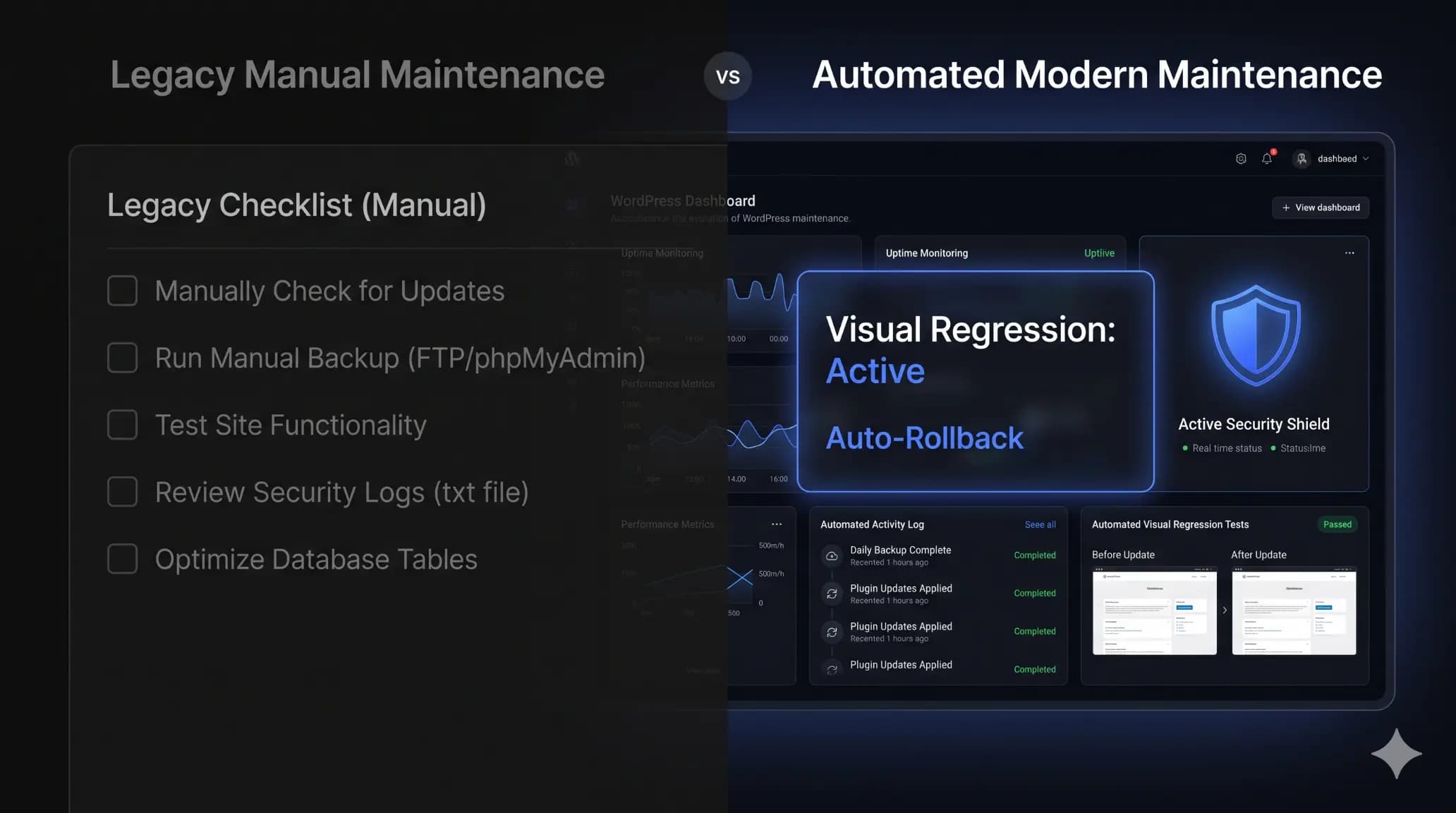
You click “Update All” across 40 client sites, cross your fingers, and wait. Three hours later, an angry client calls. Their WooCommerce checkout button disappeared after a minor plugin update.
You spend the next hour digging through backups, restoring the site, and writing a highly uncomfortable apology email.
If you run a WordPress agency, you know this scenario intimately. Bulk updating plugins saves hours of manual labor, but blind updates create immense liability. ManageWP popularized the bulk update model over a decade ago, giving freelancers a single dashboard to manage multiple sites. But the WordPress ecosystem changed. Plugin conflicts are more frequent, security threats are more sophisticated, and clients expect deeper insights.
Agencies are now actively looking for a reliable ManageWP alternative that actually verifies updates automatically. We need systems that act like an automated QA tester, not just a remote control.
Quick Answer: What is the best ManageWP alternative?
A modern ManageWP alternative is a maintenance platform that uses visual regression testing rather than blind updates. While legacy tools execute bulk plugin updates that require manual verification, platforms like SiteOps capture before-and-after screenshots, using AI to automatically roll back updates if any visual layout shift or breakage is detected.
The Evolution of WordPress and Why Legacy Tools Falter
ManageWP changed the game when it launched in 2010. It was fast, simple, and allowed a single agency owner to manage a dozen sites from a central dashboard.
GoDaddy acquired ManageWP in 2016. Since then, the platform has remained stable but stagnant. The core interface and feature set have barely evolved to meet the demands of modern development workflows. While it handles basic backups and remote updates effectively, it lacks the true automation required to manage a portfolio of complex sites.
The 2010s: The Era of Simple Blogs
When ManageWP was built, WordPress was primarily a blogging platform. Themes were simple PHP templates. CSS was straightforward. If a plugin updated, it rarely shattered the entire Document Object Model (DOM) of the website.
Legacy maintenance tools were built for this era. Pushing a button to update a plugin was generally safe because the underlying architecture of the websites was highly forgiving.
The 2020s: Complex DOMs and Fragile Ecosystems
WordPress is no longer simple. With the rise of headless setups, complex page builders like Elementor and Bricks, and dynamic WooCommerce stores relying on heavily customized JavaScript, the DOM is incredibly fragile.
A minor CSS class change in an optimization plugin can completely break a site’s layout. Legacy tools built for a simpler era cannot detect these nuanced breakages.
The True Cost of Blind Updates
When evaluating a managewp comparison, the biggest gap is post-update verification.
Pushing a button to update 20 plugins across 10 sites takes five seconds. Manually loading 10 homepages, checkout flows, and contact forms to ensure nothing broke takes two hours.
If you are not manually checking those sites, you are running blind updates. This is a massive risk. A single broken stylesheet on a high-traffic client site can cost them thousands of dollars in lost revenue before you realize the site is damaged.
Agency Reality Check: If your team spends Friday afternoons manually clicking through client staging sites to verify updates, you are burning billable hours on tasks a machine should be doing.
Update Automation: Remote Control vs. Automated QA
To understand which tool fits your workflow, we need to compare how they handle the actual daily operations of a modern agency.
The Illusion of the HTTP 200 Status Code
ManageWP offers a “Safe Updates” premium add-on. It takes a backup, updates the plugin, and creates a basic HTTP status check. If the site still loads a 200 OK status, ManageWP considers the update successful.
The flaw here is obvious: A broken CSS stylesheet, a misaligned header, or a missing ‘Add to Cart’ button still returns a 200 OK status.
An HTTP 200 status only means the server responded. It does not mean the website is usable or rendering correctly for the end user. Relying on HTTP checks is a false sense of security.
How Visual Regression Testing Actually Works
This is where the automation gap becomes apparent. When you connect a site to a newer platform, you want it to act like a developer. SiteOps introduces true visual regression testing.
Visual regression testing sounds complex, but the mechanics are highly logical:
- The system uses a headless browser to load the site exactly as a human visitor would.
- It captures a full-page, high-resolution DOM snapshot and image.
- The requested plugin update fires.
- The server cache is purged automatically to ensure fresh delivery.
- A second snapshot is taken.
- AI analyzes the structural and visual differences.
If the variance exceeds a safe threshold (e.g., text shifting, missing divs, broken images), an automatic database and file rollback is triggered instantly. You never have to manually load a client site to check for broken layouts again.
Security Posture: Reactive vs. Proactive Defense
Security is the primary reason clients pay for maintenance retainers. Your scanning tool must be flawless.
The Limits of Basic Malware Checks
ManageWP includes a basic security check feature that cross-references your site against known malware databases like Google Safe Browsing or Norton.
This is reactive security. It alerts you after the site is compromised and publicly blacklisted. By the time you get that notification, your client’s SEO rankings have tanked and their customers are seeing warning screens.
The 4-Layer Defense Strategy
Modern agency maintenance requires proactive security. A true alternative needs to scan at multiple layers to stop breaches before they happen.
- Core File Integrity: Ensuring core WordPress files haven’t been maliciously modified by checking them against the official WordPress repository checksums.
- CVE Vulnerability Scanning: According to WPScan vulnerability database reports, over 90% of WordPress vulnerabilities originate from third-party plugins. You need a system that flags plugins with known Common Vulnerabilities and Exposures (CVEs) before a patch is even available.
- Active Malware Scanning: Deep scanning of the database and file system for obfuscated PHP and backdoors.
- Configuration Checks: Blocking basic threats by ensuring files like
wp-config.phpand.htaccessare properly secured with the right file permissions.
When comparing siteops vs managewp, the depth of security analysis is a major differentiator. Platforms that integrate this 4-level deep scanning directly into the daily workflow prevent the midnight emergency calls.
Data Point: According to Sucuri’s Website Threat Research Report, over 50% of compromised WordPress sites were severely outdated at the time of infection. Communicating your proactive updates clearly is critical for client retention.
Agency Operations and Workflow Integrations
Software should adapt to your team, not the other way around.
Uptime Monitoring Beyond the Ping
Both platforms offer uptime monitoring. ManageWP pings your site and sends an email notification if it goes down. The premium add-on checks every minute.
Uptime monitoring is a commodity feature. The differentiation lies in how that data integrates into your workflow. If a site goes down, you need instant access. SiteOps monitors uptime every 5 minutes natively, but more importantly, it provides 1-click secure admin access to any connected site directly from the dashboard. Your team can troubleshoot fatal errors immediately without hunting for client credentials in a password manager.
Reporting That Justifies Retainers
Client reports justify your monthly retainer. If a client doesn’t see what you are doing, they will eventually question why they are paying you.
ManageWP provides customizable PDF reports. You can add your logo, select which data blocks to include, and schedule them to send automatically. They are functional but look heavily templated and robotic.
Agencies need reports that highlight their value, not just a list of updated plugins. The use of AI in reporting changes this dynamic. Instead of just listing “24 plugins updated,” an ideal AI monthly client report generates a brief, human-readable summary of the site’s health, security posture, and performance metrics. It proves to the client that an expert is actively managing their digital asset.
Server Load and Architecture Differences
How a management tool interacts with your client’s server dictates how much load it adds to the site.
Heavy Worker Plugins vs. API-First Approaches
ManageWP uses a worker plugin installed on the target site. It communicates via traditional PHP requests. While generally reliable, executing bulk operations via traditional worker plugins on heavy WooCommerce sites or cheap shared hosting can cause CPU spikes and temporary slowdowns for real visitors.
Modern alternatives are shifting toward lighter, API-first approaches that utilize the WordPress REST API. This minimizes the footprint on the client’s server and ensures that background maintenance tasks do not impact the site’s frontend performance or Core Web Vitals.
Pricing Models: Scaling Profitably
Profit margins are the lifeblood of a WordPress agency. How your software charges you dictates how quickly you can scale.
The A La Carte Pricing Trap
ManageWP uses a modular, per-site pricing model. The core dashboard is free, but you pay per site for critical add-ons.
- Safe updates cost $2/site.
- Automated daily backups cost $2/site.
- Premium security scans cost $1/site.
- White-label reporting costs $1/site.
If you manage 50 sites and want all the premium features, your bill scales rapidly. You could easily pay over $250 a month. Every time you sign a new client, your operational overhead increases, eating into your profit margin.
Flat-Rate Scaling for Agencies
Predictable pricing allows agencies to scale their maintenance plans profitably. This is why many agencies prefer flat-rate or tiered models.
A plan that offers unlimited sites for a fixed monthly fee—similar to the SiteOps Agency plan—ensures your software overhead stays flat. Whether you manage 20 sites or 200 sites, your costs do not increase. This allows you to retain 100% of the profit margin on every new maintenance retainer you sign.
Feature Comparison Breakdown
| Feature | ManageWP | SiteOps | Why It Matters for Agencies |
|---|---|---|---|
| Plugin Updates | Manual bulk updates | AI automated updates | Saves hours of manual clicking |
| Visual Regression | Premium add-on (basic HTTP) | Included (pixel-perfect AI) | Prevents clients from seeing broken layouts |
| Security Scanning | Basic malware check | 4-level deep scanning | Catches CVE vulnerabilities proactively |
| Client Reports | Templated PDF | AI-generated insights | Justifies high-ticket monthly retainers |
| Pricing Model | Per-site add-ons | Flat-rate unlimited tiers | Protects agency profit margins |
Why SiteOps is the Logical Next Step
Managing WordPress sites manually is not a sustainable business model. The goal of a maintenance platform is to completely remove the human element from routine tasks while maintaining absolute safety.
You need a tool that watches your back. SiteOps uses visual regression detection to ensure you never push a fatal update to production. The 4-level deep security scanning ensures you are never the last to know about a vulnerability. Automated, AI-driven reporting ensures your clients never question what they pay you for.
By automating the tedious elements of maintenance, you free up your agency to focus on high-value tasks: building new features, improving conversions, and closing new retainers.
Frequently Asked Questions
What is the best ManageWP alternative? The best alternative depends on your agency’s needs. If you require visual regression testing, automated rollbacks, and AI-driven client reports, platforms that focus on automated safety (like SiteOps) rather than just remote control are the best choice.
Is ManageWP completely free? ManageWP offers a free tier that includes basic bulk updates, monthly backups, and a performance check. However, critical agency features like daily backups, visual safe updates, and white-label client reporting require paid per-site add-ons.
Does ManageWP automatically update plugins? You can configure ManageWP to automatically update specific plugins. However, unless you pay for their premium Safe Updates add-on, it will not verify if the update broke the site’s layout or functionality.
Who owns ManageWP? ManageWP was acquired by GoDaddy in September 2016. It is now operated under the GoDaddy Pro brand, though it remains available for use with any web host.
How do I safely automate WordPress updates? To safely automate updates, you must use a tool with visual regression testing. This takes a screenshot of the site before the update, applies the update, takes a second screenshot, and compares them. If the layout breaks, the tool automatically rolls back the update.
How does SiteOps compare to ManageWP? While ManageWP is an older tool focused on remote dashboard management, a direct siteops vs managewp comparison shows that modern platforms focus on AI automation. They replace manual verification with pixel-perfect visual checks and deeper, proactive security scanning.
Is ManageWP safe to use on client sites? ManageWP is generally safe and uses encrypted connections. However, relying on its basic free tier to blindly update client plugins is risky, as it lacks automated rollbacks if an update causes a fatal visual error.
What is visual regression testing in WordPress? Visual regression testing is an automated process that compares screenshots of a website before and after a change (like a plugin update). It detects unintended visual bugs, missing elements, or broken layouts that traditional code scanners miss.
Does ManageWP slow down WordPress? The ManageWP worker plugin is generally lightweight. However, during heavy bulk operations, backups, or scans on shared hosting environments, it can cause temporary server load spikes.
How do you migrate from ManageWP to another tool? Migrating involves installing the new platform’s worker plugin on your client sites, initiating the connection, and then safely deactivating and deleting the ManageWP worker plugin from your WordPress admin dashboard.
The Bottom Line
ManageWP paved the way for remote WordPress site management. It remains a viable free option for freelancers managing a handful of low-risk, personal sites.
However, as your agency scales, the risk of a blind update breaking a critical client site becomes too high. You need automation that actually verifies its own work. SiteOps automates all of this — free for 1 site, no card required.