Every efficiency manager and marketing operations director eventually hits the same wall when scaling automation without a reliable WordPress HubSpot API Integration.
You set up a brilliant lead generation funnel on your WordPress site. To get those leads into your HubSpot CRM, you connect your form plugin to Zapier. It works perfectly for the first few months.
Then, your campaigns scale.
Suddenly, your lead volume spikes, your sales team is updating hundreds of deal stages a day, and your finance department sends you an email: “Why are we paying $500 a month for Zapier?”
This is the hidden cost of middleware. When you rely on third-party “connectors” to bridge your website and your CRM, you get charged for every single task, update, and data ping. Furthermore, the data isn’t truly real-time, leaving your sales team staring at outdated pipeline dashboards.
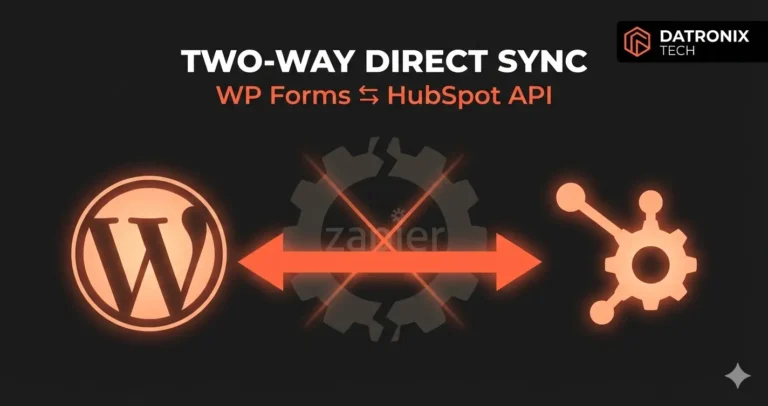
The solution is to cut out the middleman entirely. Here is the technical roadmap to building a direct, two-way WordPress HubSpot API integration using custom PHP saving your budget and giving you absolute control over your data.
The “Middleware Tax” and Why It Hurts Growth
Platforms like Zapier or Make are incredible tools for prototyping. If you are just trying to figure out how to automate lead capture from Brevo to Google Sheets, they are the perfect starting point.
But for enterprise-level lead routing into a heavy CRM like HubSpot, middleware becomes a bottleneck for three reasons:
Volume Pricing: Middleware charges per “Task.” If a user submits a form (Task 1), you search HubSpot to see if they exist (Task 2), update their contact record (Task 3), and create a Deal (Task 4), one single lead just cost you four tasks. At scale, this drains thousands of dollars a year.
The Latency Gap: Syncs often happen on 5-to-15-minute polling intervals. In a high-velocity sales environment, a 15-minute delay in lead routing means a competitor might call your prospect first.
Complex Logic Failures: What happens if a lead submits a form with a different email address but the same phone number? Standard “Zaps” struggle with complex deduplication logic, resulting in messy CRM records.
Step 1: The One-Way Push (WordPress to HubSpot)
To bypass middleware, we use the native WordPress HTTP API to talk directly to HubSpot’s REST API.
First, you must generate a Private App Access Token in HubSpot (HubSpot deprecated standard API keys for security reasons). This token acts as a secure password allowing your WordPress server to create records.
When a user submits your custom form (whether it’s Gravity Forms, WPForms, or a completely custom HTML block), we intercept the data before it saves to the database using a PHP hook.
Using wp_remote_post(), we structure the form data into a JSON payload and fire it directly to the HubSpot /crm/v3/objects/contacts endpoint.
The Custom Logic Advantage: Because we are writing custom PHP, we can instantly query HubSpot to check if the user already exists. If they do, we update their existing contact record and append the new inquiry as a note. If they don’t, we create a new contact and simultaneously fire a request to the /crm/v3/objects/deals endpoint to create a fresh sales pipeline opportunity.
All of this happens in milliseconds, while the user is still seeing the “Loading” spinner on your website.
Step 2: The Two-Way Pull (HubSpot to WordPress)
Pushing data to HubSpot is only half the battle. True operational efficiency requires a Two-Way Sync.
Imagine you have a client dashboard on your WordPress site where users log in to check the status of their project. When your sales rep moves a Deal Stage in HubSpot from “Pending” to “Approved,” that status needs to update on the WordPress frontend instantly.
You cannot achieve this efficiently with standard no-code automation platforms without eating up massive task quotas.
The Solution: HubSpot Webhooks. Instead of WordPress constantly asking HubSpot, “Did anything change?” (which wastes server resources), we tell HubSpot to notify WordPress only when a specific action occurs.
We create a custom REST API endpoint on your WordPress site (e.g.,
yoursite.com/wp-json/custom/v1/hubspot-webhook).Inside HubSpot, we create a Workflow. The trigger is: Deal Stage is updated.
The action is: Trigger Webhook. HubSpot fires a payload containing the Deal ID and the new stage directly to your custom WordPress endpoint.
WordPress receives the data, authenticates it (to ensure it actually came from HubSpot), and updates the user’s dashboard database in real-time.
Step 3: Bulletproofing the Architecture (Error Handling)
The biggest risk of building a direct API connection is network failure. What happens if the HubSpot API is down for maintenance exactly when a VIP client submits a $50,000 lead form?
If you don’t build error handling, that lead vanishes into the void.
When architecting a custom integration, we implement a Fallback Queue. If the wp_remote_post fails (returning a 500 error or timing out), our PHP script catches the failure. It saves the JSON payload locally in a custom WordPress database table labeled “Pending API Retries.”
A WordPress cron job runs every 10 minutes, checks this table, and attempts to push the failed leads to HubSpot again until it receives a 200 OK success message. No data is ever lost.
Conclusion: Stop Renting Your Data Pipes
Zapier and its competitors are incredible tools, but they are essentially toll roads. The more traffic you drive, the more expensive the toll becomes.
By investing in a custom, direct API integration, you convert a recurring monthly operational expense into a one-time capital asset. You get faster data, cleaner CRM deduplication, and a zero-marginal-cost growth curve.
When your marketing team scales from 100 leads a month to 10,000, your software bill won’t increase by a single cent.
Ready to see how much you could save by cutting out the middleman?👉 Get the API Integration Cost Saver Calculator. Let’s map out your endpoints and calculate your exact ROI.